Password

Enter the password to view this case study.

Incorrect password. Please try again.

JP Morgan Chase

Building Design Capability Inside the World's Largest Bank

Established a design practice from zero for a banker-facing CRM platform serving small business banking, while personally shipping the Call Plan feature and BSR Dashboard used daily by relationship managers across the country.

Role VP Experience Design
Reports To SVP, Product
Timeline 2024 – 2025
Team 3 designers
Platform Salesforce / Business Central
Leadership Track
Building the Practice
No design function existed. I stood one up, restructuring the team, establishing research infrastructure, aligning executive stakeholders, and shifting a product organization from assumption-driven to evidence-driven decision making.
IC Track
Shipping the Work
With a team of three early-career designers, I stayed hands-on. Running in parallel: the Call Plan feature, a full pre/post meeting workflow, and the BSR Dashboard redesign, the homepage every banker in the portfolio saw every day.

A Platform Built Without Design

JP Morgan Chase's small business banking division ran on Business Central, a Salesforce-based CRM used by Business Relationship Managers to manage leads, retain clients, and connect small business owners with JPMC's financial products. The platform existed and functioned. But it had been built entirely by engineering and product teams with no dedicated design function.

The consequences were predictable: no research informing product decisions, no feedback loops from the bankers using it daily, no design standards, and no way to understand what was actually working. The BSR Dashboard was a wall of disconnected widgets, stale data requiring manual refreshes, and no clear hierarchy of what mattered. The Call Plan tool did not exist. Bankers were preparing for client meetings in external documents, losing context between calls, and manually copying task and lead data before every conversation.

The team I inherited was three designers, all early career, all operating as narrow specialists without cross-functional skills to own a problem end to end. My job was to fix the platform, develop the team, and establish a design function that did not exist, simultaneously, without slowing down delivery.
What I Owned

Three Decisions That Built the Practice

Standing up a design practice in a regulated enterprise requires sequencing carefully. You cannot introduce everything at once without overwhelming both the team and the organization.

The Call Plan: Designing a Workflow Bankers Actually Use

Business Relationship Managers at JPMC conduct hundreds of client meetings per year. Before this work, there was no structured way to plan those meetings inside the CRM. Bankers were taking notes outside the system, losing context between calls, and manually copying task and lead data into external documents before every conversation.

The Call Plan feature lives inside Business Central and covers the full pre-call to post-call workflow: agenda creation, contextual data surfacing (tasks, leads, opportunities, service requests, financial accounts), attendee management, post-meeting notes, and disposition recording. Every state, loading, error, completion, copy confirmation, was designed and documented.

Before

How bankers prepared for client calls

  • No in-CRM call planning tool
  • Notes maintained in external documents
  • Task and lead context manually compiled before each call
  • No post-call disposition tracking in system
  • Meeting history disconnected from client record
  • KYC compliance alerts buried or absent at call time
After

What the Call Plan delivers

  • Structured pre-call agenda within the CRM
  • One-click copy of tasks, leads, opportunities, service requests
  • Financial accounts panel surfaced contextually
  • Post-call notes and disposition recorded in system
  • Full meeting history attached to household record
  • KYC and compliance alerts surfaced at call time
business-central.jpmorgan.com / A HOME AND A... / CP-0000904
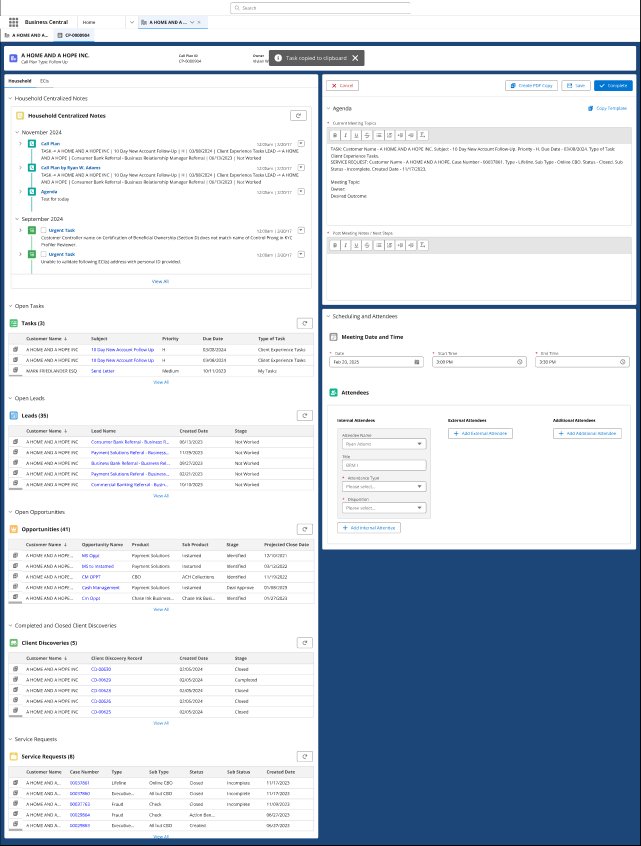
Call Plan split view — left context panel showing Household Centralized Notes with KYC Urgent Tasks flagged, Open Tasks, 35 Leads, 41 Opportunities, Client Discoveries, Service Requests. Right panel showing Agenda editor with Topics to Discuss, Post Meeting Notes, Scheduling and Attendees with date/time fields and Internal/External/Additional attendee columns.
Call Plan, in-progress state. CP-0000904, A HOME AND A HOPE INC. Left panel surfaces the full household context: Centralized Notes with prior call plans and KYC Urgent Task alerts (beneficial ownership mismatch, ECI address validation failure), 3 open tasks, 35 leads, 41 opportunities, 5 client discoveries, 8 service requests. Right panel: active agenda editor, Post Meeting Notes, Meeting Date/Time, and Attendees with Internal/External/Additional columns. Task copied to clipboard toast confirms copy action. Business Central CRM, JPMC Small Business Banking.
Completion Flow

After a banker clicks Complete, three paths were designed based on how the confirmation is surfaced: a Success Modal (full-screen overlay with Yes/No prompt to create a new call plan), a Toast with Hyperlink (non-blocking banner with inline link to create next plan), and Toast with Buttons (non-blocking banner with Yes/No actions). The modal variant was shipped in the initial release. Toast variants were documented as future enhancements to reduce interruption for high-volume callers. Completing a call plan always prompts the next: the system defaults to a Follow-up call plan type with the same household pre-selected.

Key Design Decisions

Every decision constrained by compliance requirements, Salesforce platform limits, and bankers using this between calls, not at a desk in ideal conditions.

1

Surface KYC compliance alerts at call time, not buried in the record

Beneficial ownership mismatches and unvalidated ECI addresses were accessible only by navigating deep into the client record. Bankers were showing up to calls without knowing these issues existed. I moved compliance alerts into the left panel, surfaced at the top of the contextual view. Required legal and compliance review to determine what could be displayed in a call planning context without triggering additional disclosure requirements.

Compliance reviewed: KYC display rules, beneficial ownership disclosure
2

One-click copy for tasks, leads, and opportunities, not manual transcription

Bankers were manually copying task and lead data into external documents before calls. The copy functionality lets bankers pull any task, lead, opportunity, service request, or client discovery directly into the meeting agenda with a single action, formatted automatically, eliminating transcription errors and prep time.

Platform constraint: Salesforce Lightning copy API required custom component
3

Separate pre-call and post-call zones with distinct permission logic

The original spec was a single editable form. Pre-call and post-call content have completely different edit windows and compliance implications. I redesigned around two explicit activity zones with distinct field validation, save logic, and completion gating, making the workflow legible to new bankers while ensuring compliance fields could not be submitted incomplete.

Compliance reviewed: Disposition fields, mandatory completion gating
4

Scoped Financial Accounts as a future enhancement and documented why

Stakeholders wanted real-time balance data across SBA loans, Chase Performance accounts, credit cards, and paymentech merchants visible in the Call Plan immediately. I pushed this to a documented future enhancement track. The integration architecture required would have delayed the core workflow by months. A working Call Plan without financial data shipped faster and delivered more value than a delayed one that included it. The enhancement was sequenced, not abandoned.

Architecture constraint: Real-time balance data required a separate integration sprint

The BSR Dashboard: Making Portfolio Data Actionable

The BSR Home Page Dashboard was the first thing every Business Service Representative saw when they opened Business Central. It was meant to be their operational command center, portfolio health, pipeline, tasks, leads, compliance flags, and relationship activity all in one view.

In practice it was generally unusable. Data required manual refreshes and was stale by months. Widgets had no priority hierarchy. A critical KYC outreach queue sat visually equivalent to a placeholder chart with no data. Click-to-Call had no visible configuration. The entire dashboard was a grid of equal-weight boxes with no guidance on where to look or what to act on first. I led and designed the full redesign across six improvement areas, all while the Call Plan was running in parallel.

Before

BSR Dashboard problems

  • Data stale by months, required manual refresh
  • No visual hierarchy, all widgets equal weight
  • KYC outreach queue (2,034 items) buried in grid
  • Click-to-Call phone number had no visible edit path
  • Portfolio interaction rates shown but not actionable
  • Empty-state widgets cluttered the primary view
After

What the redesign delivered

  • Auto-refresh with last-refreshed timestamp visible
  • Clear hierarchy: portfolio health, pipeline, compliance
  • FRB KYC Outreach queue surfaced with full task detail
  • Click-to-Call banner with inline edit and reset modal
  • 90/180 day interaction rates linked to actionable reports
  • Drill-out views for All Tasks, Credit Risk, Leads, Service Requests
business-central.jpmorgan.com / Home — BSR Dashboard
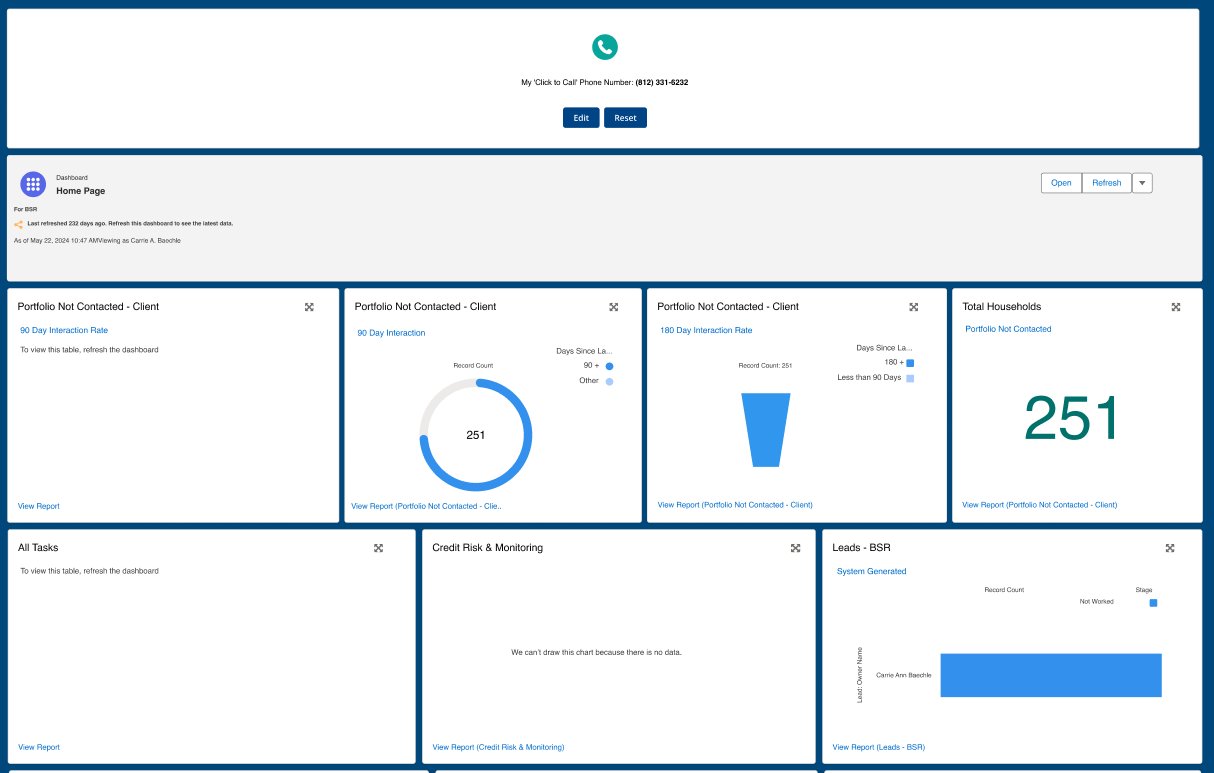
BSR Home Page Dashboard showing Click-to-Call banner, Portfolio Not Contacted widgets with 90 Day and 180 Day interaction rates, All Tasks, Credit Risk, and Leads BSR drill-out widgets.
BSR Home Page Dashboard, Business Central CRM. Click-to-Call banner with Edit/Reset. Portfolio Not Contacted showing 90 Day and 180 Day interaction rates (251 households). All Tasks, Credit Risk and Monitoring, Leads BSR drill-out widgets. Last refreshed timestamp, Open and Refresh controls.

Key Design Decisions

The dashboard required a different kind of discipline than the Call Plan. Less about feature design, more about information architecture and triage under constraints.

1

Surface the KYC outreach queue as a first-class element, not a buried widget

With 2,034 unassigned FRB KYC outreach tasks sitting in a queue, compliance exposure was significant. The existing dashboard treated this identically to a cash management opportunity chart, same widget size, same visual weight, buried in the grid. I redesigned the KYC outreach section as a full-width, high-contrast panel with amber border treatment and a full drill-out table showing subject, customer, status, due date, and assigned banker.

Compliance reviewed: FRB KYC task display requirements, unassigned queue visibility rules
2

Add Click-to-Call configuration to the persistent top banner

Bankers used Click-to-Call constantly but the phone number configuration was buried, the edit path unclear, and new bankers regularly called from incorrect numbers. I moved the Click-to-Call control to a persistent top banner with inline Edit, Reset, and Open actions and a modal for updating the number. Simple change, significant friction reduction.

Compliance note: Call must be made from branch phones only, disclaimer added to edit modal
3

Establish portfolio interaction rates as the primary dashboard hierarchy

The existing dashboard had no priority hierarchy. A stale empty-state chart held the same visual weight as a 90-day portfolio contact rate table showing 251 households without any interaction. I restructured the information architecture so portfolio health sits at the top and drives the first action. Bankers should know within 10 seconds of opening the dashboard which relationships are at risk.

Design principle: Risk surfaces first, pipeline second, administrative last
4

Sunset the Closed Agendas widget and replace with drill-out reports

The Closed Agendas widget tracked a legacy workflow replaced by Call Plans. Rather than a simple removal, I designed the transition: sunsetting the widget while introducing drill-out report views for All Tasks, Credit Risk and Monitoring, Leads BSR, and My Service Requests. Each drill-out gives bankers the full data table behind the dashboard summary, something the old widget never provided.

Migration: Sunsetting required confirming no active users depended on closed agenda data exports

What the Work Delivered

Results across both tracks within the first year.

15%
Improvement in banker NPS through research-driven design
3 → 3x
Same team headcount, tripled output through generalist restructure
2
Major features shipped in parallel: Call Plan and BSR Dashboard
0 → 1
Design function built from zero: research, standards, feedback loops, roadmap influence
SVP
Competitive analysis directly influenced product roadmap at SVP level
Compliant
All work passed JPMC regulatory review including KYC, FRB, and disposition gating

What I Learned

Working inside the world's largest financial institution forces precision in ways that most product environments never require. Every decision gets documented. Every field has a legal owner. Every change needs a paper trail.

What Broke

Running Call Plan and Dashboard in parallel while building the practice created real capacity compression. In the first month, I underestimated the coaching load of restructuring three designers simultaneously while maintaining IC output. I should have sequenced the upskilling, stabilizing one designer then the next, rather than shifting all three at once.

What I'd Do Differently

Push harder for a dedicated researcher from day one. Distributing research across generalists produced good work but fragmented the picture. Each designer knew their surface deeply but nobody held the full view of banker behavior across the platform. One embedded researcher would have changed the quality of our roadmap conversations with SVP leadership significantly faster.

Want to talk through this work?

Happy to walk through the Call Plan design, the dashboard redesign, the practice-building approach, or how we navigated compliance constraints in detail.

Get in Touch